The videos you scroll past
Ding! become recipes
Paste a Douyin, Xiaohongshu, Bilibili, or YouTube link and Pullit's AI pulls out the ingredients, quantities, steps, and calories — into a recipe you can actually cook from.







Three steps to the table
From a food video you scrolled past on Douyin or Xiaohongshu to a dish on the table — Pullit takes over the tedious part in the middle.
Paste a video link
Works with nine platforms — Instagram, TikTok, YouTube, Pinterest, Douyin, Bilibili, Xiaohongshu, Xiachufang and WeChat Channels. Copy and paste a link, or share straight into Pullit. No downloads, no note-taking.
AI extracts everything
Spoken instructions and on-screen captions are transcribed, then read alongside the footage to detect ingredients, exact quantities, steps and cook times. Anything it gets wrong you can edit, and the original link and text stay attached.
Start cooking in one tap
Guided step-by-step mode with voice narration and automatic timers — no unlocking the screen with flour on your hands.
More than just bookmarks
From scrolling and saving to shopping and cooking, Pullit covers the whole journey — not just another folder of links you never open.
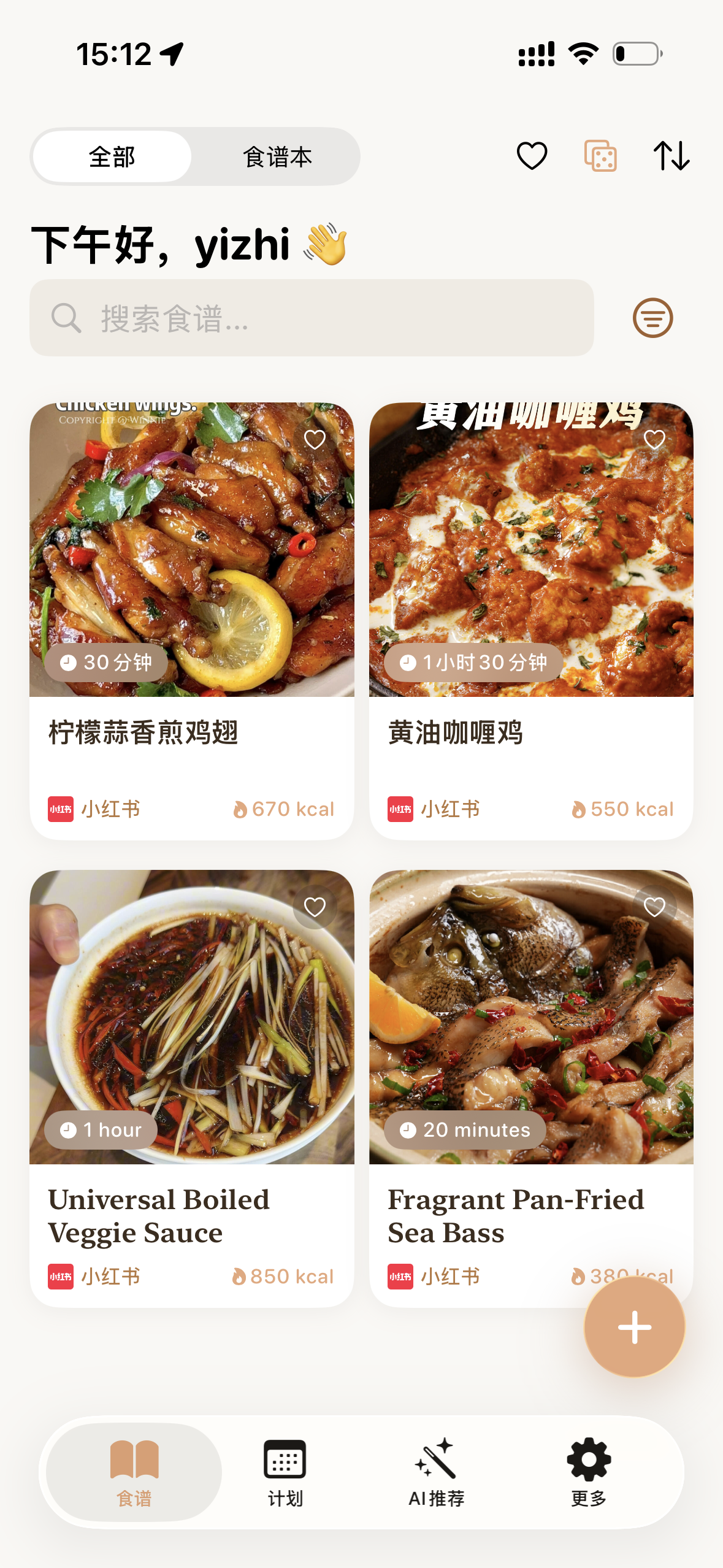
Smart recipe library
Every saved recipe is auto-organized into cookbooks, searchable by dish or ingredient, so you find anything in a second.
Weekly plan
Plan a week of meals and Pullit merges every ingredient into one grocery list — nothing forgotten, nothing bought twice.
Plan together
Share one weekly plan and grocery list with your family — open the app and you are both looking at the same list.
Themed cookbooks
Collect dishes you want to try and meals you have made into cookbooks — and share a whole one with a friend.
Nutrition info
Automatic estimates for calories, protein, fat, and carbs, so you can plan around a cut or a bulk.
Cooking mode
Large-font steps, built-in timers, voice narration and the same steps on Apple Watch — cook without touching the screen.
Always at home
Say once that your kitchen always has salt, oil and rice. After that they're quietly collected at the top of your shopping list to confirm, instead of crossing them off by hand every week.
Your favorite food platforms
organized together
Wherever you scroll for food videos, Pullit pulls out the recipe — Instagram, TikTok, YouTube and Pinterest, plus Douyin, Xiaohongshu, Bilibili, Xiachufang and WeChat Channels. Nine platforms, one app.
Xiaohongshu Douyin Bilibili Xiachufang Instagram YouTube TikTokBeyond video links, import recipes via camera capture or pasted text.
AI that actually helps
AI saves you time at every step of the cooking journey — not just a word on the homepage.
Video → recipe, fully automatic
Pullit analyzes subtitles and visuals to build a standardized recipe — ingredient list, exact amounts, step-by-step instructions, and cook times. All you do is paste the link.
Photos and text, organized too
Photograph a paper recipe or a cookbook page, or paste some text, and AI turns it into a recipe you can keep editing.
Smart shopping list
Ingredients from multiple recipes auto-merge and dedupe into one optimized grocery list.
Questions people ask
The most common questions about turning videos into recipes, pricing, and device support.
Which video platforms does Pullit support?
Nine platforms are publicly supported today: Instagram, TikTok, YouTube, Pinterest, Douyin, Xiaohongshu, Bilibili, Xiachufang and WeChat Channels. Copy the share link from the video or post, paste it into Pullit, and extraction starts — you can also share straight into Pullit, and there's no need to download the video first.
How do I turn a TikTok or Douyin video into a recipe?
Tap share in the app, copy the link, then paste it into Pullit. The AI reads both the subtitles and the footage to detect the ingredient list, exact quantities, step-by-step method, and cook times, and builds a structured recipe in under a minute. Everything it produces stays editable, so you can fix anything it misread.
I have hundreds of saved recipes. Can Pullit organize them?
Yes. Imported recipes land in your library, sorted into cookbooks and searchable by dish name or ingredient. You can also group dishes by theme — weeknight dinners, baby food, holiday baking — and share a whole cookbook with a friend.
What if I only have a photo or some text, not a link?
That works too. Pullit imports from your camera or from pasted text, so you can photograph a page from a paper cookbook, or paste the method a friend messaged you, and the AI turns it into an editable recipe just the same.
How accurate are the quantities and calories?
Ingredients and steps come from what the original creator said; the AI structures it, so accuracy depends on how precise the source video was. Calories, protein, fat, and carbs are automatic estimates based on those ingredients and amounts — useful for keeping an eye on your diet, but not medical or professional nutrition advice. Every value can be edited by hand.
Is Pullit free? What do I get without paying?
The app is free to download, and the recipe library, weekly plan, grocery list, and cooking mode are all free to use. Importing from a video link comes with 5 free runs a week (the counter resets every Monday); importing from a photo or pasted text does not count against it. A membership raises the link limit.
Which devices and languages are supported, and can my family share it?
Pullit runs on iOS and Android, with the interface available in Simplified Chinese, Traditional Chinese, English, and Arabic. A shared plan lets you and the people you cook for work from the same weekly menu and grocery list — whatever one of you ticks off, the other sees on returning to the app.
Ding! Your recipe is ready
Free to download — turn the food videos you scroll past into a real meal.